


From 218 hours of manual server pre-checks to a single command. The story of turning repetitive infrastructure work into intelligent automation - with a little help from AI.
By Siddharth S | Infrastructure Automation Engineer, Galent | SWARM 2: Show and Tell
My job is to automate the day-to-day tasks so people can stop doing boring, repetitive work by hand.
I'm an Infrastructure Automation Engineer. Which, in my mother's understanding, means I fix computers. When relatives ask what I do, she tells them, "He restarts computers."
Honestly, some days she's not entirely wrong.
But here's what I actually do.
Behind every application we use at work are servers powerful computers running in data centres or in the cloud. Most of ours run on Windows. And we have 655 of them.
Every month, Microsoft releases security updates for Windows. These updates, commonly called patches, fix vulnerabilities before attackers can exploit them. All 655 servers need to be checked, patched and checked again, safely and on schedule.
That's called patching. And it's a lot more than clicking Update.
Before patching, every server needs a health check. After patching, it needs another one. Then come reports, spreadsheets, emails, reboots and compliance checks.
Every month. Like clockwork.
And every time I automate one task, my boss comes up with another.
The three most dangerous words in IT?
"Quick one, Siddharth."
If you've worked in IT, you know there's no such thing as a quick one. First, it's pre-checks. Then post-checks. Then reboots. Then application testing.
And the deadline?
Friday.
So I had two choices: clone myself or find a partner who never sleeps, never takes a tea break and never says, "That's not my job."
Well that partner was AI.
The 218-hour problem
Before automation, a typical patching cycle involved a surprising amount of manual work.
For every server, someone had to log in and check CPU, memory, disk space, running services, pending reboots and the last patch installed. Then, after patching, do it all over again.
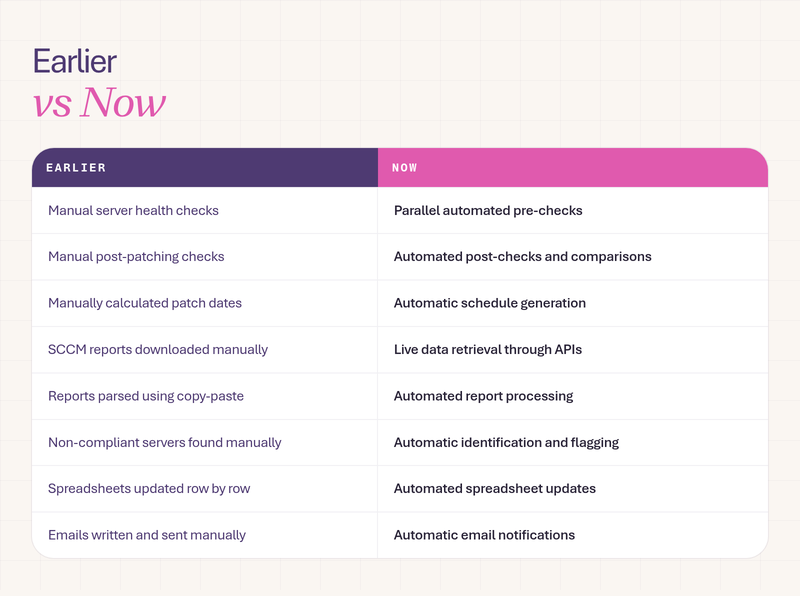
There were also patch schedules to calculate, SCCM compliance reports to download, data to parse, non-compliant servers to identify, spreadsheets to update and emails to send.
Some days, it felt like I spent more time copying and pasting than engineering.
Then I did the maths.
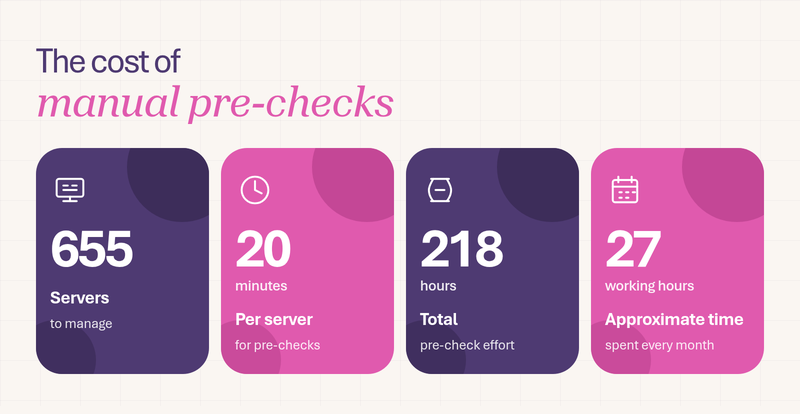
The takeaway: Nearly an entire working month spent just checking servers before patching. Every single month.
That's just pre-checks. Every single month.
And my boss called it a "quick one".
That was the moment I stopped asking, "How do I work faster?" and started asking a much better question:
"How do I make the computer do this for me?"
AI: From repetitive work to intelligent automation
I didn't start with a fancy AI idea. I started with a very real problem and a lot of repetitive work.
I used Claude as my AI assistant to help design, build and improve an automation solution around our existing infrastructure tools.
Think of it like a restaurant kitchen.
Ingredients come in. The kitchen processes them. The head chef checks the food. And the finished plate goes out.
Here's how our version works:
1. Getting the ingredients
The solution connects to SCCM, our patch management tool, through its API. Instead of manually exporting reports, the automation retrieves the patching groups and server information directly.
Credentials are securely retrieved from CyberArk, our password vault. No passwords are hard-coded into scripts, and the credentials rotate automatically.
2. Letting the automation do the work
A schedule generator determines which server groups are due for patching. The pre-check then scans multiple servers in parallel instead of checking them one by one.
After patching, the post-check repeats the scan and compares the results with the original health data.
3. Turning data into insights
Raw data isn't particularly useful when you're looking at hundreds of servers. So we built an insights layer that helps make the information easier to act on.
It identifies threshold breaches, summarises server health, detects changes after patching and ranks the biggest offenders so the team knows where to look first.
Today, this layer uses rules designed with AI assistance. The next step is to integrate Claude directly to generate plain-English summaries and suggest likely reasons behind issues.
4. Making the results accessible
Every run produces an Excel report, stores the results in an Azure database for historical tracking, and automatically emails the team.
The goal is simple: less manual reporting, better visibility and faster decisions.
How AI became my architect, builder and debugger
One of the biggest surprises was how much AI could help beyond writing code.
I used Claude in four different ways:
- As an architect: It helped me plan the solution step by step before writing a single line of code.
- As a builder: It worked with me across PowerShell, Python, SQL and HTML to develop the automation.
- As a debugger: Connecting to SCCM was a challenge. We tried five different authentication approaches. The first four failed. On the fifth attempt, we finally got HTTP 200. That's the computer's way of saying, "Welcome, come in." I almost cried.
- As a documenter: It helped create guides, emails, reports and even the presentation.
But there's one important distinction I want to make.
AI did not run our servers. AI helped me design, build and test the automation faster.
I still made the engineering decisions. I still determined what was safe. And I still controlled what went into production.
AI is the co-pilot. I'm still the pilot. Mostly.
The after
So, what does patching look like now?
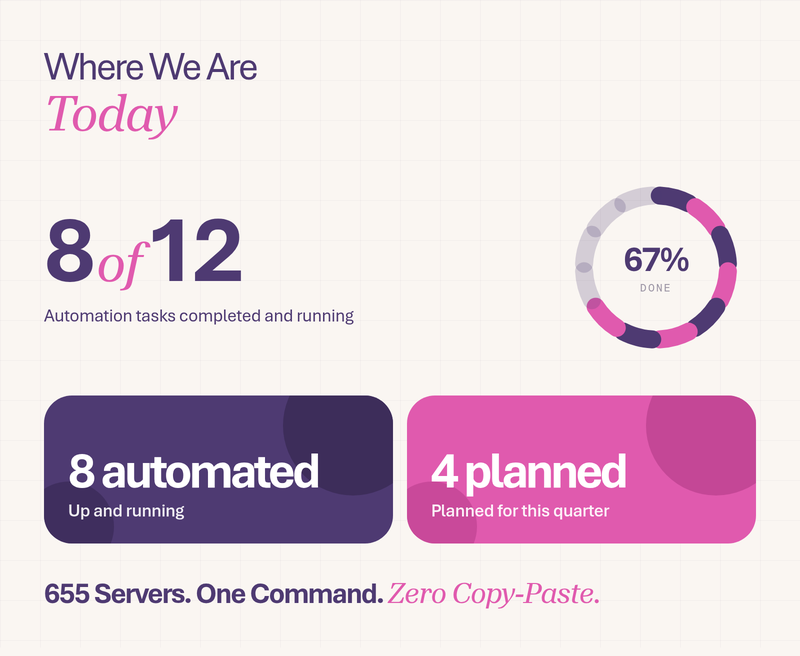
Eight of the twelve identified manual tasks have been automated and are running today. Four more are planned for this quarter.
Here's what's changed:
And the work doesn't stop here.
The next phase includes controlled reboots in small batches, with health checks after each batch and explicit human approval before execution. We're also working towards automated decommission checks, a live compliance dashboard and application testing after patching.
Because a server that reports a successful patch isn't necessarily a server whose applications are working perfectly.
That's the next problem to solve.
Three things I learned along the way
Looking back, this journey taught me three things:
1. AI removes the boring parts, not the people.
It replaced my copy-paste, not me. The real opportunity is to free engineers from repetitive tasks so they can focus on solving more meaningful problems.
2. Start with the problem, not the tool.
I didn't wake up one day wanting to use AI. I woke up facing 218 hours of pre-checks. The pain came first. The tool came second.
3. Imagination is the new bottleneck.
If you can describe a problem clearly, you can probably start building a solution. The most valuable skill isn't necessarily typing faster or knowing every programming language. It's thinking clearly, staying curious and being willing to experiment.
That's what I shared at SWARM 2: Show and Tell, where Galent builders came together to demonstrate what they're creating with AI.
For me, the biggest takeaway wasn't that AI could write code. It was that it helped me take an everyday engineering problem and turn it into something I wouldn't have imagined building on my own.
And that's the exciting part. There's always another process to improve, another repetitive task to automate and another idea worth exploring.
So, educate yourself every day. Stay curious. And create a life you don't need a vacation from.
Have a problem you've been itching to solve with AI? Bring it to SWARM.
Join the SWARM community, meet fellow builders and share what you're experimenting with. You could be the next person on stage at SWARM 3.
JOIN THE SWARM COMMUNITY →